
Follow these steps to connect your Etsy store:
1. Access your Artiststore dashboard
Sign up for a free Artiststore account, or log in to your existing account to access the dashboard.
2. Open the Store Connection page
From the menu on the left, go to:
Integration Management → Store Connection
3. Select Etsy
Find Etsy in the list of available sales channels and click Connect.
4. Authorize the connection
Sign in to your Etsy account, then click Grant Access to connect your store to Artiststore.
5. Complete the setup
Once you’ve authorized your Etsy store and finished the required setup, the connection will be complete and you can start selling.
For store checks and shipping setup after Etsy authorization
━━━━━━━━━━━━━━━━━━
Important Notice:
Etsy applies strict reviews to product categories and store compliance. Do not bulk-sync categories that Artiststore has not confirmed as supported, as this may result in listing removal, review issues, or store restrictions.
1. Important Notes Before Connecting
Category Review Risk Do not sync unconfirmed product categories directly to Etsy. Etsy may review product categories, intellectual property, listing completeness, and fulfillment capability. Non-compliant or abnormal syncing may affect listings or store status.
Recommended Setup Sequence
1. Confirm that the product to be synced belongs to a supported category and is linked to the corresponding Artiststore fulfillment product tag.
Examples: Custom Pins, Custom Keychains, Paper Printed Matter, Custom Standees, Custom Stickers, Custom Home and Living, Custom Clothing and Accessories, and Best-selling Range.
2. After authorizing your Etsy store, first check the shipping and processing profiles. Do not publish products in bulk immediately.
3. Sync products only after confirming that shipping destinations, shipping fees, and estimated delivery times are fully configured.
4. For other categories, create the listing manually in Etsy first, then contact Artiststore for technical integration.
2. Configuration Checks After Authorization
In Etsy Shop Manager, go to: Settings → Shipping settings.
Figure 1. Open Etsy Shipping settings and locate the shipping profile created by Artiststore
Step 1. Check the Shipping Profile
After authorization, Artiststore automatically creates a shipping profile in the designer’s Etsy store. Locate ARTIST_STORE_DEFAULT_SHIPPING_TEMPLATE and click the edit icon on the right to configure it.
Figure 2. Shipping profile editing page and Standard shipping settings
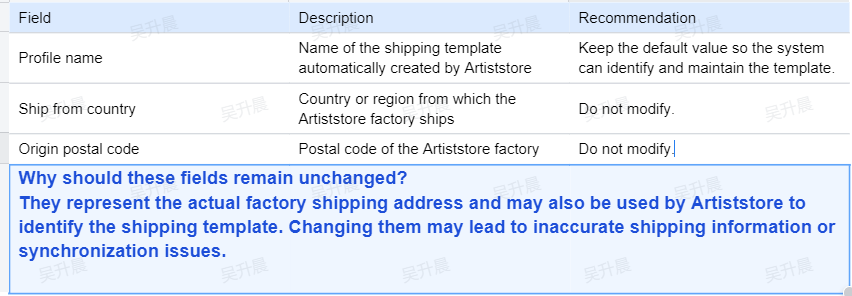
Fields You Should Not Modify
Required: Check and Complete Standard Shipping
● Shipping service: Select the logistics service actually provided. Choose Other if no matching service is available.
● Delivery time: Enter the estimated transit-time range in business days.
● What you’ll charge: Select a shipping charge method, such as Fixed price.
● One item: The shipping fee charged for the first item purchased.
● Additional item: The additional shipping fee for each extra item in the same order.
● Shipping destinations: Add the countries or regions you can ship to and configure delivery times and shipping fees for each destination.
Required: Standard shipping determines available destinations, estimated delivery times, and the shipping fee paid by the buyer. Incomplete settings may prevent listings from being published or buyers from placing orders.
Step 2. Check Processing Profiles
At the top of the Shipping settings page, locate Your processing profiles. After authorization, Artiststore initializes processing profiles; confirm that they have been created.
Figure 3. Example of two processing profiles initialized by Artiststore
The default setup may include the following profiles:
● Made to order (1–10 days): For customized or made-to-order products produced after an order is placed.
● Ready to ship (1–2 days): For in-stock products that can be dispatched quickly.
Adjust Based on Actual Operations:
A Processing profile represents the time from order placement to dispatch. Designers may adjust it based on production, inventory, and shipping capacity, but the promised timeline must be realistic and achievable.
Figure 4. Locations of Processing profiles and Shipping profiles
Step 3. Configure Shipping Fees and Destinations
Designers set shipping fees based on their business strategy. Buyers pay these fees to the designer according to the Etsy configuration. Follow these guidelines:
● Cover target markets: Add only countries or regions that can be served reliably.
● Cover actual costs: Consider first-item shipping, additional-item shipping, packaging, and possible remote-area surcharges.
● Allow a delivery buffer: Base estimates on actual logistics performance and allow extra time for holidays or customs clearance.
● Review regularly: Update the Shipping profile whenever shipping rates or routes change.
Configuration Example (For Reference Only)

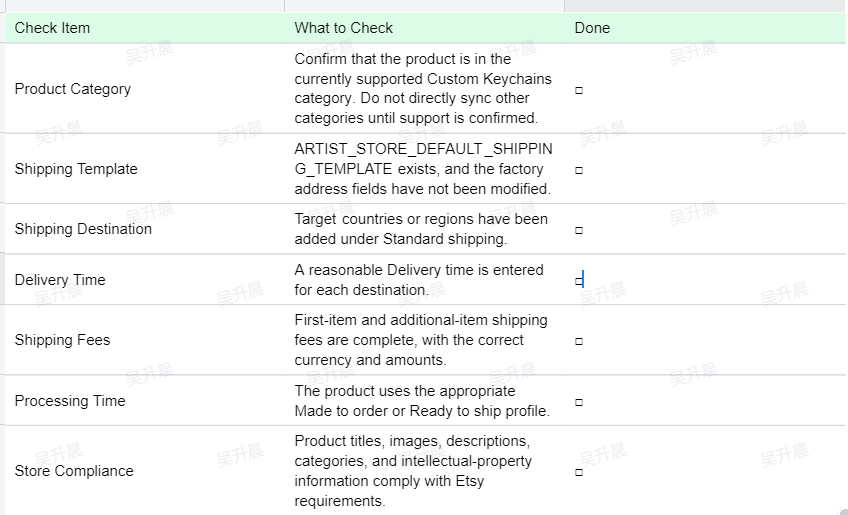
3. Pre-Publishing Checklist
4. Frequently Asked Questions
Q1: Can I change the factory shipping country and postal code?
This is not recommended. These fields represent the actual Artiststore factory shipping address. Changing them may display an incorrect shipping origin to buyers or affect system recognition.
Q2: Who sets and pays the shipping fees?
The designer sets the shipping fees in the shipping profile, and the buyer pays them to the designer when ordering on Etsy. The fees should cover the actual logistics costs.
Q3: Can the Processing profile be changed?
Yes. Designers may adjust processing times based on actual production and inventory capacity, but should not promise timelines they cannot meet.
Q4: What should I do if syncing still fails after configuration?
Check the product category, shipping destinations, shipping fees, processing time, and Etsy store status. If the issue persists, save a screenshot of the error and contact Artiststore Customer Support at service@artiststore.com.
Final Reminder:
Complete your shipping and processing-time settings before syncing products. Only sync product categories that have been confirmed as supported.
After syncing, please review the product information on Etsy, as some text may need to be updated due to formatting differences between Artiststore and Etsy.
You can check shipping rates in two ways:
- View our Shipping Policy.
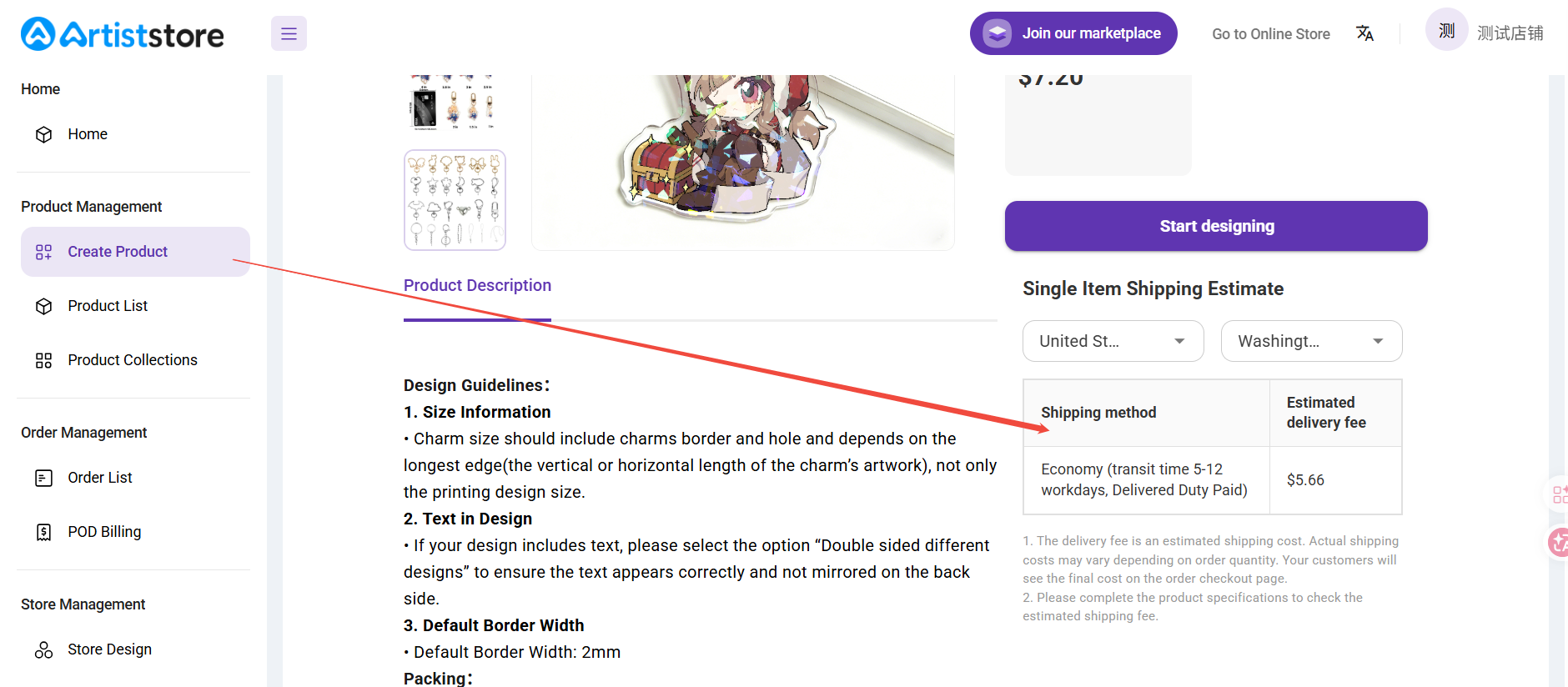
- Go to the Create Product page in your Artiststore dashboard, then select the destination country and region to get an estimated shipping cost.
Etsy Integration Video Guide:
Etsy production partner setup guide
How to Add or Update a Shipping Profile on Etsy
⚠️ Special Note
Etsy has specific listing requirements that products must meet before they can be synced successfully. For example:
- All SKUs or variants must have the same price
- The product description cannot be left blank
- The product title must begin with a lowercase letter