

In your dashboard, go to Store Design and create a new store layout.
1. Overall Page Layout
The store design page is divided into three main areas:
- Left panel: Page content panel
- Center panel: Live page preview panel
- Right panel: Section settings panel
Adding a section from the left, preview it real-time in the center, and adjust its settings on the right.
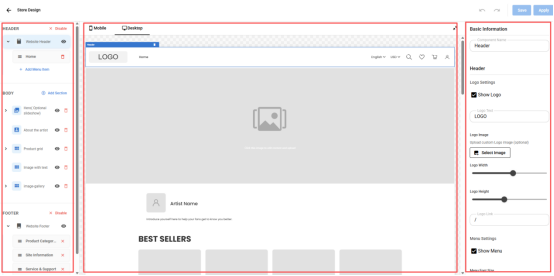
The storefront consists of three main parts:
- Header
- Body
- Footer
2. Header
The header appears at the top of the homepage, usually showing your logo, navigation menu, and quick links.

In the header, you can:
- Manage navigation menu items
- Enable or disable the header section
- Control the overall structure of header
3. Body
Body is the main area where you can add sections like products, text, images, or blogs.
Section types include:
- Product Grid
Displays products in a clean grid layout, suitable for showing multiple items. Each product can include an image, name, and price, helping customers browse easily.
- Product Carousel
Displays products in a carousel format, automatically or manually sliding. Ideal for featuring new arrivals, bestsellers, or themed collections to attract attention.
- Hero (Optional Slideshow)
Top-of-page hero section, can be a single image or a slideshow. Perfect for showcasing brand stories, promotions, or featured products for visual impact.
- Image with text
Image paired with text, ideal for highlighting product features, explaining services, or conveying brand values.
- Image
Displays a single image, suitable for product details, artwork, or visual elements.
- Blog posts
Showcases the artist's latest creative updates or personal posts, ideal for sharing stories, work progress, or reflections to engage visitors.
- About the artist
Introduces the artist or designer, sharing personal background and creative story, helping customers connect and build trust.
- Collection List
Displays a list of product collections, allowing customers to quickly browse items by category.
- Rich text
Add formatted text for brand descriptions, announcements, or promotional messages.
In the body area, you can:
- Add and edit multiple sections
- Reorder sections using drag and drop
- Hide sections without deleting them
4. Footer
Footer is a bottom area with links to policies, contact info, and social media.
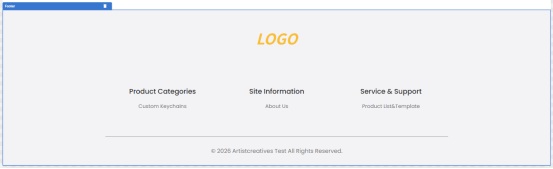
In the footer area, you can:
- Add your social links
- Enabled or disabled the footer
- Add quick links(e.g., Home, About Us, Contact, FAQ)
- Control the overall structure of footer
Feel free to experiment with these sections to achieve your vision for your store homepage layout!