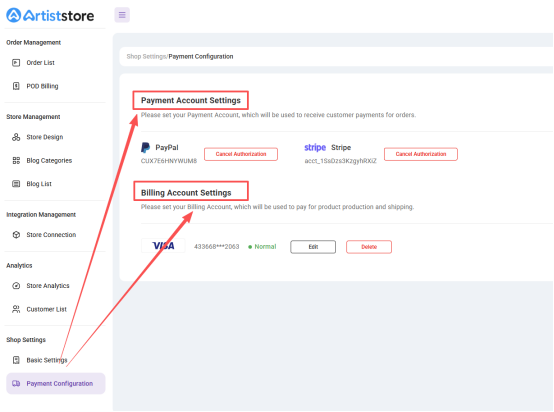
1. Payment Account Setup
- Access Payment Settings:
Go to Shop Settings → Payment Settings and choose your preferred payment method (PayPal or Stripe).
- Bind Your Payment Account:
Connect your PayPal or Stripe account to receive your earnings.
- Modify Account:
If you need to change your payment account, you must first unbind the existing account and then rebind a new one to avoid any disruption in receiving payments.
Tip: We recommend linking your most frequently used payment account and regularly reviewing your billing statements. If you notice any discrepancies, contact customer support for verification.
2. Billing Account Setup
Go to Shop Settings → Payment Settings and add your billing account (e.g., Visa card).
Please ensure that the account has sufficient funds, as insufficient balance may affect order fulfillment.