

You can publish a blog post on Artiststore by following these steps:
Step 1: Create a Blog Category (Optional but Recommended)
Before publishing a blog post, we recommend creating a blog category to better organize your posts.
1. Log in to your Artist Dashboard
2. Go to Store Management → Blog Categories
3. Click New
4. Enter a category name (e.g. FAQs, Design Inspiration, Project Stories)
5. Submit the category
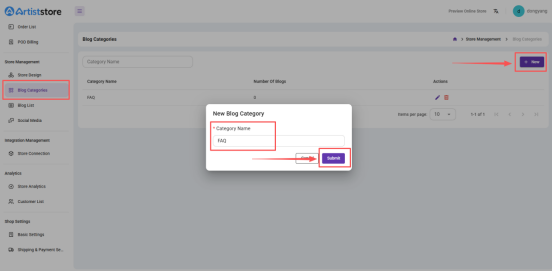
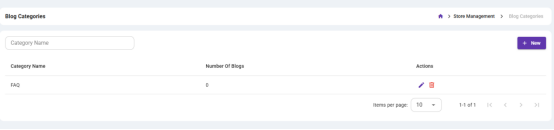
You can create multiple categories and manage them at any time.
Step 2: Create a Blog Post
1. Go to Store Management → Blog List
2. Click Create Post to open the blog editor
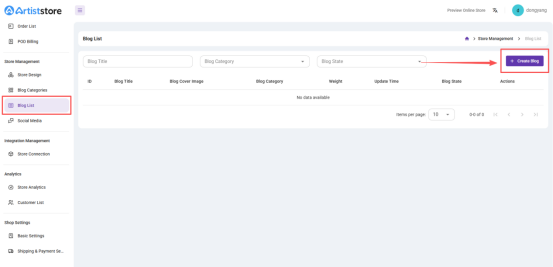
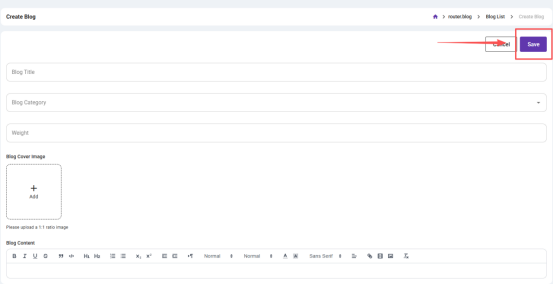
3. Fill in the blog details:
- Post Title: Keep it clear and descriptive
- Post Content: Use the editor to add text, images, links, and other content
- Cover Image: Upload a JPG or PNG image (recommended aspect ratio 1:1, no watermark)
- Post Category: Select a previously created category
4. Click Save
The post will be saved as unpublished and appear in your blog list.
5. Publish the Blog Post
Find the blog post you want to publish in Blog List, then change the post status to Active / Published.
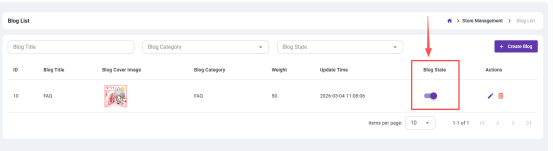
Once published, you can feature this blog in your storefront in Store Design.
Notes:
You can edit or unpublish a blog post at any time from the Blog List.
Deleted blog posts cannot be recovered, so please proceed with caution.